Solitaire
- 4.7
- Rating
- 10.00M
- Installs
- Free
- Price
 Analysis by App-foxy
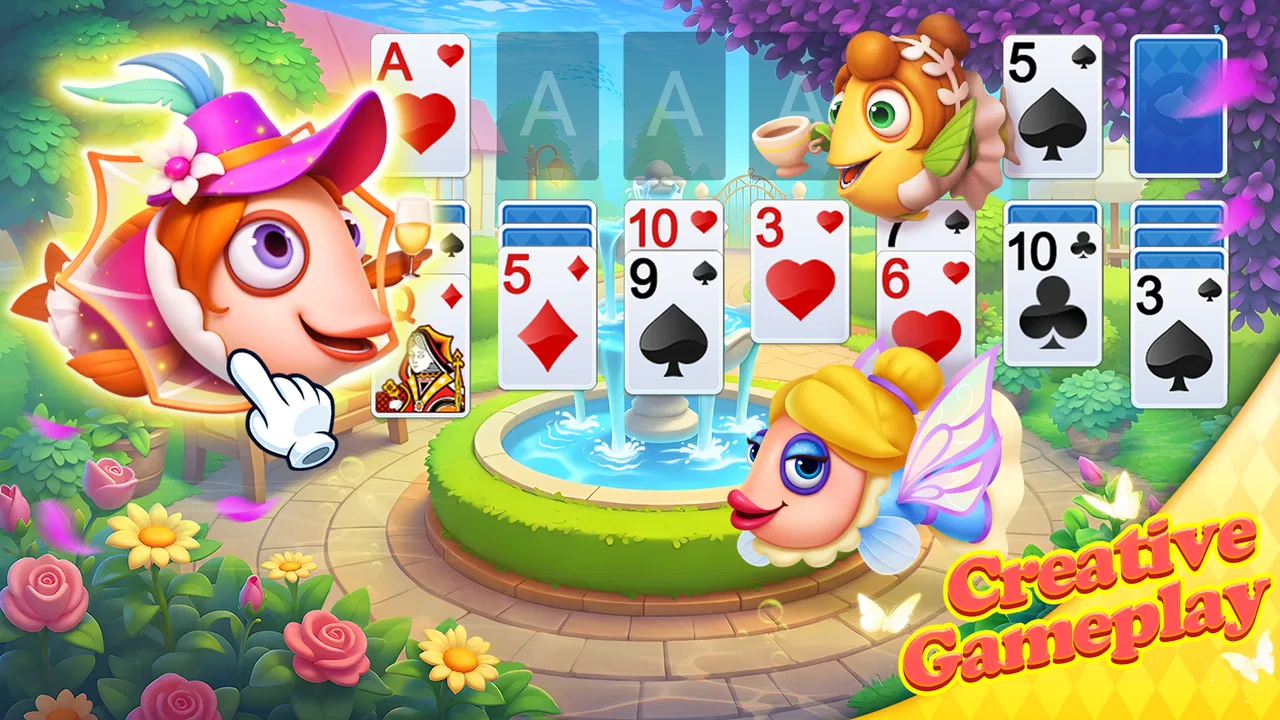
Solitaire Aquarium is the kind of card game I open when I want something calm, familiar, and easy to understand without committing to a long session. It takes the classic solitaire idea and places it in an ocean-themed setting, so the card play remains the main activity while the presentation gives it a softer, more relaxing mood. The game is free to download, suitable for Everyone, and made by Solitaire Aquarium.
My first impression is that this is aimed at people who already know the basic rhythm of solitaire, but it is also approachable if you are starting from scratch. You move cards into descending sequences, alternate colors where the rules allow it, and gradually uncover the hidden cards until the layout is cleared. The ocean setting makes the experience feel less bare than a traditional card table, although players looking for a deep strategy game should keep their expectations realistic.
What the first game feels like
The opening experience is straightforward. You launch the game, enter the card table, and can begin making moves almost immediately. There is no need to learn a complicated control scheme. On a phone, the main challenge is not understanding the rules but tapping accurately when several cards are close together. I found that taking a second to look at the whole layout before moving anything made the early turns much easier.
You May Also Like

 Pandora - Music & Podcasts
Pandora’s Music Is Easy to Start, but Harder to Recover
Pandora’s strength is its low-effort path from a seed to a station. Its weak spot is how much confidence it asks you to place in connection, setup, and quiet recovery.

 8 Ball Pool
 Is Built on Rivalries, Rematches, and Routine
A close look at the rivalries, rematches, shared routines, and unanswered safety questions that turn a quick pool match into a persistent mobile community.

 Samsung Music
’s Quiet Strength Is Playing What You Already Own
Its reach comes less from spectacle than from dependable access to a personal library. That simplicity is both the app’s strongest retention engine and its ceiling.

 AccuWeather: Weather Radar
AccuWeather Review: A Quick, Clear Forecast for Everyday Decisions
For everyday plans, the best forecast is the one you can understand quickly. AccuWeather makes rain timing, radar, and local conditions easy to act on, with a few trade-offs.

 Hill Climb Racing
Why Hill Climb Racing Still Turns Crashes Into One More Run
A tiny car, a bumpy hill and one more upgrade: Hill Climb Racing keeps resurfacing because its simple chaos makes every near-miss feel personal.

 AliExpress - Shopping App
AliExpress Makes Global Shopping Feel Personal, but Shoppers Bear the Risk
AliExpress turns a global marketplace into a pocket-sized discovery engine. Its reach is useful, its shopping loop compelling, and its trade-offs easy to miss.
More From Our News Desk
View All News


The best way to approach the first deal is to treat every move as a small decision rather than tapping randomly. Start by looking for face-down cards that can be exposed. Revealing one of those cards is usually more valuable than simply moving an already visible card into a convenient position, because hidden cards are what restrict your options later. This is a useful habit for newcomers and prevents the game from feeling like trial and error.
The ocean presentation gives the familiar rules a different emotional tone. Instead of feeling like a plain puzzle on a blank screen, the game tries to create a gentle underwater atmosphere around the cards. That makes it a natural fit for short breaks, quiet evenings, or moments when I want a game that does not demand constant attention. It is still solitaire underneath, but the setting helps it feel more inviting than a basic utility-style version.
There is also a practical advantage to the simple format: I do not need to remember a story, manage a large collection, or understand a complicated progression system before enjoying a round. The central loop is immediately recognizable. That simplicity is a strength for first-time users, although it can also become a limitation for experienced card players who want unusual rules or a more demanding strategic layer.
Getting from the opening layout to a meaningful win
For a first successful game, I recommend focusing on three priorities. First, uncover face-down cards whenever the move does not damage your future choices. Second, avoid filling an empty tableau space too quickly unless the card you place there helps reveal something important. Third, keep an eye on the cards you may need for the foundation piles instead of sending every available card upward the moment it becomes legal.
That last point is easy to overlook. A card can be legally moved to a foundation and still be more useful on the main table for building a sequence. New players often assume that any legal foundation move is automatically correct. In practice, pausing to consider whether the card is needed to organize another column can prevent a promising layout from becoming blocked.
When I am playing casually, I use a simple rhythm: scan the face-up cards, identify the move that opens the most information, and only then consider tidy-up moves. This makes the first meaningful success feel earned rather than lucky. It also teaches the structure of solitaire naturally, without requiring a separate tutorial or a long explanation of every possibility.
Touch controls matter more than people expect in a card game. If a move does not register, I try tapping the card once and then tapping the destination instead of repeatedly dragging. That approach is often more deliberate on a small screen. I also avoid making rapid moves when several cards overlap, because a hurried touch can select the wrong card and interrupt the flow of an otherwise good deal.
Small habits that make the card table easier
One useful habit is to count the visible options before committing to a move. If two cards can be placed in the same column, I usually choose the one that leaves the other available for a different sequence. This is a minor distinction, but it helps preserve flexibility. Solitaire often becomes difficult not because there are no legal moves, but because the earlier legal moves were chosen in an unhelpful order.
Another practical tip is to delay moving a long visible sequence until I know what the empty space will be used for. Empty columns can be powerful because they allow a king-led sequence to be placed there, but using the space merely to shift cards around may not improve the position. I treat an empty column as a resource, not just a convenient parking area.
I also find it helpful to pause after revealing a new card. The instinct is to move immediately, especially when the game feels relaxed, but a newly exposed card can change the best order of several moves. Taking a brief look at the whole layout often reveals a chain of actions that would have been missed by playing one card at a time.
These habits are especially useful for someone who has played solitaire only occasionally. They do not turn every deal into a guaranteed win, but they make losses easier to understand. Instead of feeling that the game simply refused to cooperate, I can usually identify where I spent a useful empty space, buried an important card, or chose a tidy move over a revealing one.
Where new players may hesitate
The most common confusion is knowing whether to prioritize the foundation piles or the tableau columns. The foundation is the final destination for each suit, but the tableau is where most of the problem solving happens. I try not to rush cards upward unless doing so clearly opens another move. Keeping a card in the tableau for a little longer can be the better choice when it helps build or rearrange a sequence.
Another point that can surprise beginners is the importance of color and rank together. A red card cannot simply be placed on any lower card; the alternating-color rule matters. It is easy to see a descending number and tap too quickly, especially on a phone. When a move fails, I check both conditions rather than assuming the control is not responding.
Empty spaces can also be misleading. They look useful, but they are not interchangeable with ordinary columns. In a standard solitaire arrangement, the empty tableau position is generally reserved for a king or a sequence led by a king. Remembering this rule explains why a seemingly obvious move is unavailable and helps avoid wasting time trying the same action repeatedly.
The stock and waste area may require a little patience as well. When several cards are available in sequence, I do not automatically take the first legal card. I look at whether the next card might be more important, particularly if drawing or cycling through the available cards changes the order in which I can access them. The exact best choice depends on the layout, but the general lesson is to think one step beyond the move currently visible.
For people who are completely new to solitaire, the first few rounds may feel slower than expected. That is normal. The game is not difficult because the controls are complicated; it is difficult because each move changes the options that follow. Once that relationship becomes familiar, the card table becomes much more readable, and the relaxing theme can do what it is intended to do instead of distracting from the rules.
How it fits into an ordinary day
A realistic use case for me is a short break between tasks. I can begin a round while waiting for an appointment, play a few moves, and stop without needing to remember a complicated objective. It also works well at the end of the day when I want something more engaging than scrolling but less demanding than a competitive game. The familiar rules make it easy to return after a pause.
That convenience does not mean every player will enjoy it equally. If you want multiplayer competition, elaborate deck construction, or a campaign with a strong narrative, this is probably not the right choice. Its appeal comes from repeating and refining a classic solo activity, not from constantly introducing new systems. Players who prefer quick arcade reactions may also find the deliberate pace too quiet.
Compared with a plain solitaire app, the main difference is the aquarium-inspired atmosphere. A minimalist alternative may be better if you want the cards to occupy nearly all of your attention or if you prefer a strictly utilitarian interface. On the other hand, someone who finds traditional solitaire visually dull may appreciate having a more pleasant setting around the same familiar rules.
Compared with more complex card games, this one asks for less preparation and less long-term planning. You do not need to study a collection of cards or build a specialized strategy before starting. The trade-off is that the experience may feel repetitive once the classic solitaire loop stops being satisfying on its own. I would choose it for relaxation and routine, not for discovering a constantly changing competitive meta.
Free access and the role of purchases
The game is free, which makes it easy to try without making a commitment at the start. Optional in-app purchases range from under a dollar to around a hundred dollars per item. Because of that wide range, I would advise new players to spend time learning whether the basic card experience suits them before buying anything. A relaxing game does not need to become an impulse purchase simply because an optional item appears at a convenient moment.
My own approach with games like this is to play several ordinary sessions first. That gives me a clearer idea of whether I value the theme, the pace, and the way the game handles mistakes. If you are installing it for occasional use, the free entry point is the most sensible place to begin. If you dislike optional purchase prompts in otherwise simple games, that is a reason to compare it with a more stripped-down solitaire alternative before settling in.
The age rating of Everyone also makes the game broadly suitable for households where different people may use the same device. That does not change the strategic nature of the card game, but it does reinforce its role as a gentle, general-purpose pastime rather than a title built around intense action or mature themes.
Performance expectations and version details
Solitaire Aquarium supports Android devices using version 5.0 or later, so it remains accessible on many older phones and tablets. The current version is 1.4.42. For a first-time user, the practical takeaway is simple: check the Android version before installing, especially if the device has been out of service for several years.
The game has built a substantial audience, with over ten million installs, a 4.7 average from around two hundred forty thousand ratings, and roughly sixteen thousand written reviews. Those figures suggest that the basic concept has broad appeal, but they should not replace personal testing. Solitaire preferences are unusually individual: one player may find the calm presentation inviting while another may prefer a completely plain card table.
Since the developer is Solitaire Aquarium, the identity of the game and its presentation are closely connected. I would not choose it solely because it is a famous classic; I would choose it because it combines that classic with an underwater mood. That distinction matters when comparing it with other solitaire downloads that focus more narrowly on speed, customization, or competitive scoring.
Who should install it next
I recommend Solitaire Aquarium to a first-time player who wants a gentle introduction to solitaire and a setting that feels more welcoming than a blank card interface. It is also a good match for someone who already knows the rules and wants a low-pressure game for short sessions. The most satisfying path is to begin with the free experience, learn to prioritize hidden cards, and use each deal as practice in preserving future choices.
I would skip it if your main goal is a deep strategy system, online competition, or a large variety of card modes. A more feature-heavy card game will offer more long-term complexity, while a minimalist solitaire app may provide a cleaner and faster route to the cards themselves. The aquarium setting is the reason to choose this particular version, not a substitute for features it does not aim to emphasize.
For a new user, my recommended first session is simple: start a deal, inspect all visible cards before touching anything, uncover a hidden card when possible, and resist sending every legal card to the foundation immediately. If a move feels confusing, check the alternating-color and descending-rank rules, then look at the empty-column restriction. Those small checks remove most early frustration.
After a few rounds, the next step is to play more deliberately rather than simply faster. Notice which moves preserve multiple options, which ones consume an empty space without a clear benefit, and when a foundation move helps the table rather than merely making it look tidier. That is where the game becomes more than a casual tap-through activity.
Overall, I see Solitaire Aquarium as a friendly, focused version of a familiar card pastime. Its strengths are its approachable rules, calm ocean presentation, free starting point, and suitability for short solo sessions. Its limitations are equally clear: the classic loop may not hold the attention of players seeking constant novelty, and optional purchases mean some users may prefer a simpler alternative. For anyone who wants solitaire with a more relaxing visual identity, Solitaire Aquarium is a sensible place to begin.
FAQs for Solitaire
01What features does the Solitaire app offer?
The Solitaire app offers a classic card game experience with customizable themes and backgrounds. Users can enjoy daily challenges, undo moves, and use hints to improve their gameplay. Additionally, the app includes different versions of Solitaire such as Klondike and Spider, enhancing the gaming experience.
02Is the Solitaire app free to download and play?
Yes, the Solitaire app is free to download and play. However, it may offer in-app purchases for premium features like ad removal or additional themes. These purchases are optional and the core game remains fully accessible without spending money.
03Does the Solitaire app require an internet connection?
The Solitaire app can be played offline, making it perfect for users who want to enjoy the game without an internet connection. However, features like daily challenges or updates may require connectivity to function properly.
04Is the Solitaire app suitable for all ages?
Yes, the Solitaire app is suitable for all ages. Its simple rules and intuitive gameplay make it accessible for both children and adults. Parents can rest assured that the game contains no inappropriate content, making it a family-friendly option.
05How can I customize the look of my Solitaire game?
The Solitaire app allows users to customize their gaming experience by changing card backs, table backgrounds, and themes. These options can be accessed through the settings menu, enabling players to personalize their game to suit their preferences and enhance visual appeal.
Pros
- Intuitive interface for easy gameplay.
- Multiple game modes to keep it interesting.
- Offline play available without ads.
- Customizable themes and card backs.
- Smooth animations enhance user experience.
Cons
- Ads appear in the free version.
- Limited hints in harder levels.
- Battery drain on prolonged use.
- In-app purchases for premium features.
- No multiplayer or online modes.

Solitaire
Gallery